Disclaimer: I hate writing. I’m using AI to get my ideas onto paper. The opinions, experience, and numbers are mine. The grammar is not.
A while back I wrote about rusticle, the Rust GIF library I built over a holiday break. The headline was a palette LUT trick that made resize 4–6x faster than gifsicle. Since then I’ve spent more time on the quality side: tuning the encoder against a larger corpus with Butteraugli in the loop.
I had a story I wanted to tell when I started: “I tuned the optimizer with Butteraugli and it got better.” That story turned out to be wrong. The useful story is narrower: the big wins came from fixing correctness bugs the metric exposed, not from tuning harder.
PSNR and SSIM agreed everything was fine
The original benchmarks for rusticle leaned on PSNR and SSIM. Both metrics looked good:
- Rusticle PSNR was higher than gifsicle on most of the corpus.
- SSIM was within rounding distance of 1.0 on almost everything.
- Speedup vs gifsicle was 6x average.
By those numbers I should have been done. The problem is that PSNR and SSIM are pixel-difference metrics with no real model of human vision. They reward smooth differences and underweight things humans actually notice: color shifts on edges, banding in flat regions, frame-to-frame instability. A frame can have visible corruption and still post a respectable PSNR if the damage averages out across enough pixels.
I added Butteraugli (the perceptual metric from the JPEG XL project) as a third quality signal mostly because I wanted a reality check. The pure-Rust port made it cheap to wire in. I expected it to roughly track PSNR. It did not.
The first run
Here is what the metrics looked like on the original 24-file tuning corpus, default config, vs gifsicle:
| Metric | Rusticle | Gifsicle | Delta |
|---|---|---|---|
| PSNR (dB) | 41.36 | 35.97 | +5.39 |
| SSIM | 0.9987 | 0.9940 | +0.005 |
| Butteraugli | 2.92 | 4.54 | -1.62 |
Aggregate Butteraugli also favored rusticle. So far so good. Then I broke it down by category:
- cartoon: rusticle worse by +0.60 BA
- large dimensions: rusticle worse by +1.14 BA
- transparent: rusticle worse by +0.23 BA, with one file at 9.70 BA absolute (catastrophic)
- pixel art / photographic / many-frames / simple: rusticle better by 2–4 BA
The aggregate PSNR/SSIM numbers did not make that worst case obvious. Butteraugli did. The transparent category had a file where rusticle was producing broken output and the older reporting path averaged it into “fine.”
That was the first useful thing the metric did: it told me where to look.
The tuning sweeps that didn’t work
The next round of work was mostly aimed at the wrong problem. I ran a coarse sweep across 60 configurations (4 filters × 3 optimize levels × 5 lossy settings), held out a validation split, picked a winner. The “winner”, filter=lanczos3, optimize=o1, lossy=100, had a great train/validate Butteraugli, but it failed every guardrail I cared about:
- Output size was 2–3x larger than gifsicle.
- The “speedup” was actually slower than my own default config.
- It didn’t generalize to a 39-file unseen holdout.
On the holdout it got worse. Mean Butteraugli for the tuned global profile was 9.22 (gifsicle was 7.19). Worst case was 241.30 BA, which is not a tuning miss. That’s frame corruption. Three files couldn’t even be measured because of buffer-size mismatches in the quality comparison code.
This is where I stopped tuning and started reading the encoder.
The bugs
There were four. None of them were tuning problems. They were all correctness bugs that any aggressive metric was going to surface eventually, and Butteraugli got there first.
1. Disposal-aware optimization used the wrong reference state
GIF frames have a “disposal method” that says what to do with the canvas after a frame is shown: leave it, restore the background, or restore the previous frame. When my optimizer marked unchanged pixels transparent (the standard “diff against previous frame” trick), it was diffing against the previous frame buffer instead of the post-disposal canvas state.
For a Background or Previous disposal frame, those are completely different things. The optimizer was happily declaring pixels “unchanged” that weren’t, because the canvas state at decode time wasn’t what the optimizer was comparing against.
What I compared:

frame N-1 buffer
        |
        v
current frame diff

What the decoder actually shows:

frame N-1
   -> apply disposal
   -> post-disposal canvas
        |
        v
current frame diff
This was the source of the 241.30 BA worst case. After the fix:
trapezius_animation_small2: 237.27 → 0.76 BA (a 99.7% improvement on a single file)galilean_moon_laplace_resonance_animation_2: 75.15 → 0.09 BAvoyager_58m_to_31m_reduced: 27.21 → measurable (it had been failing the quality assertion entirely)
This bug had been in the code from the start. Aggregate PSNR and SSIM did not force the issue because the corruption was concentrated in specific frames of specific files, and per-frame averaging hid it.
2. Subframe lossy used the wrong canvas state
The O3 optimization pass crops each frame down to the bounding box of changed pixels. The lossy compression pass, which runs after, was applying its perceptual threshold to the cropped subframe as if it were a full-canvas frame. So lossy was making decisions based on the wrong reference, and on Keep/None disposal frames it was corrupting them.
Fix: composite the subframe back onto the full canvas in the proper reference state before measuring. Standalone fix, but combined with the disposal fix it took the holdout worst-case BA from 241 down to 40 (default profile) and 3.59 (tuned profile).
3. Lossy was hidden inside optimize()
This is the embarrassing one. My optimize() pass had grown a perceptual threshold parameter, meaning “structural optimization” was actually doing lossy compression depending on how it was called. That made the API a lie and made the experiments unreproducible. If you ran the same optimize level twice with different lossy settings, you couldn’t actually tell whether the structural pass was running.
Fix was to set the structural threshold to 0 (lossless only) and move all perceptual thresholding into a separate, explicit lossy() call. No metric improvement, but every experiment after that point was honest.
4. Quality measurement silently masked failures
When the quality measurement code hit an invalid state (bad buffer size, disposal frame without proper reference state, etc.), it was returning a fallback “perfect” score instead of an error. So files that were actually broken were getting recorded as PSNR = inf, SSIM = 1.0 and dragging the averages up.
Fix: return errors. This made my old aggregate numbers look slightly worse, but it also meant I could trust them.
What the corrected default looks like
Once those four fixes landed, I reran the full holdout. Same pipeline, same profiles, but with the disposal/subframe/measurement bugs fixed:
| Profile | Before BA | After BA | Worst BA Before | Worst BA After |
|---|---|---|---|---|
rusticle_default | 13.09 | 3.85 | 241.30 | 40.48 |
rusticle_tuned_global | 9.22 | 0.46 | 241.30 | 3.59 |
The tuned profile still scored better on Butteraugli, but it paid for that with size/runtime tradeoffs that made it a bad default. The important change was the collapse of the disposal/subframe corruption tail. Most of the apparent “tuning gain” from the earlier sweep was the tuned config avoiding damage from bugs underneath the tuning surface.
The default holdout still had one elevated tail case (~40 BA). That was not a disposal/subframe corruption bug. It pointed at a separate representation/quantization problem, which the Voyager study below isolates more cleanly.
I then ran a larger 149-file corpus pass on the corrected default. Worst rusticle Butteraugli was 7.60. Worst rusticle-vs-gifsicle delta was +1.09. Most of the worst-by-rusticle files were also files where rusticle still beat gifsicle, including two cases where gifsicle had its own catastrophic failures (74+ BA) and rusticle did fine. On that corpus, the corrected default path is broadly competitive.
The Voyager study, kept honest
There’s a separate result that I want to mention because it’s interesting on its own terms, but I want to be careful about not overgeneralizing it.
One file kept resurfacing in the investigation: a NASA Voyager animation. It is 6 frames, opaque, stable global palette, and already pretty close to optimal as a GIF. On that file, I tested four representation strategies head-to-head:
| Candidate | Bytes | Avg BA | Worst BA | PSNR |
|---|---|---|---|---|
| rusticle default | 381 KB | 4.99 | 7.58 | 41.53 |
| gifsicle baseline | 421 KB | 1.46 | 2.64 | 45.93 |
| opaque bbox + global palette | 221 KB | 1.60 | 1.93 | 46.08 |
| opaque bbox + local palette | 251 KB | 1.21 | 1.63 | 47.56 |
| transparent sparse + local | 277 KB | 122.60 | 133.59 | 14.81 |
The two “opaque bbox” variants beat both rusticle’s default and gifsicle on both bytes and quality. The “transparent sparse” variant, which is what an aggressive general-purpose optimizer would tend toward, was catastrophically bad: a perceptual quality score about 80x worse, output that’s visibly destroyed.
You can compare them yourself:
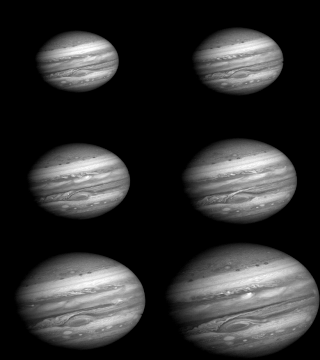
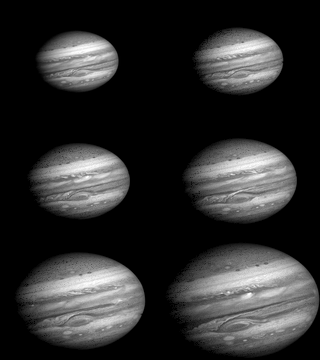
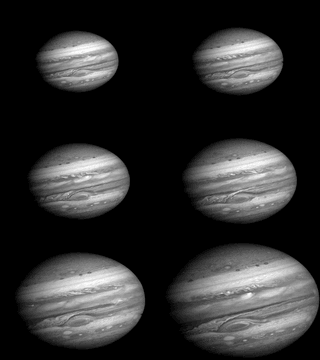
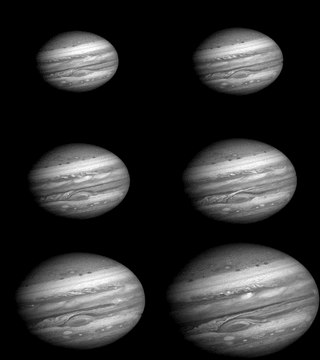
The lesson here is not “transparency is bad.” Transparency is the right answer for a lot of GIF content: sparse animations, UI recordings, anything with stable backgrounds. The lesson is that for this specific class of file (already opaque, stable global palette, low changed-area ratio), introducing synthetic transparency to chase smaller diffs makes things actively worse. The general-purpose optimizer was being too clever for content that was already well-formed.
That’s a real win, but it’s a narrow one. A 70-file taxonomy pass showed about 87% of files looked “Voyager-like” by structure, but that doesn’t mean they all benefit equally. Most are already small enough that the representation choice doesn’t matter much. The wins concentrate on a smaller subset.
I have a working two-path implementation that classifies inputs and routes opaque-delta GIFs to the bbox/global path. On a 126-run evaluation it routed as expected (66.7% Path A, 33.3% Path B, zero fallbacks). But the auto-routed pipeline currently posts a 4.5% Butteraugli regression and 16.6% runtime overhead vs the corrected default. The architecture is useful research, not a default.
What I’d tell someone doing this
Three things I wish I’d internalized earlier:
Pick a metric that disagrees with you. PSNR and SSIM agreed with my code. That’s not the same as my code being right. The whole reason to add a third metric is to find what the first two missed.
Measurement failures must be errors. A quality measurement that returns “perfect” when it can’t actually measure is worse than one that crashes. You can fix a crash. You can’t fix a number you can’t trust.
Representation beats knobs. The 42% byte savings on Voyager came from changing how frames were structured (opaque bbox patches, reused global palette), not from tweaking quantization parameters. The single biggest BA improvement on the holdout came from fixing the disposal reference state. Neither of those is a config change.
Where this leaves rusticle
The corrected default path is the current product answer. It’s broadly competitive with gifsicle on the corpora I’ve tested it on, faster on most files, and no longer has the disposal/subframe corruption failures that started this investigation.
The two-path optimizer is in the tree but gated. I’m not shipping it as default until I can show it beats the corrected path on more than the narrow class it was designed for.
Mainline:

decode -> resize -> corrected optimize -> lossy -> encode

Research:

decode -> classify
          |-> opaque bbox / global palette  (Voyager-like)
          |-> corrected default path        (general case)
The Voyager-class result is real but bounded. Opaque bbox patches with global palette reuse are the right answer for a specific structural pattern. Generalizing it requires a larger and more diverse corpus than I currently have. That’s the next useful investment: better data, not more knobs.
If you want to play with any of this, the code is at github.com/GEverding/rusticle. The tuning journals, harness reports, and corpus outputs are all in the repo if you want to check the numbers.
Most of what I learned doing this had nothing to do with GIFs.